A Bulk Replenishment Order is an order that is raised to replace all stock from a selected Warehouse. The items looked at are ONLY those items currently in live wardrobes. If an item is not currently in a wardrobe, but IS in a Warehouse an order will NOT be raised for the item regardless of its current stock.
The quantity ordered when this type of order is placed when:
- Current stock + Quantity outstanding on existing Replenishment Orders is less than the Minimum Stock Value.
The order quantity placed will be:
- Maximum Stock Value – (Current Stock Value - Quantity outstanding on existing Replenishment Orders).
Notes:
- Existing Replenishment orders taken into consideration are orders with a status of: 'Just Raised' OR 'Placed on Supplier'
- Replenishment Orders automatically get set to Complete when ANY stock is booked in against them. This means that any outstanding items not delivered will no longer get taken into consideration, i.e. be seen as still to be delivered, when calculating replacement stock required based on Min Max and current stock values for the next Replenishment order. The status of any order, apart from Complete Replenishment orders, can be changed manually on the Adjust Stock screen.
Replenishment Orders CANNOT have their status changed once the first lot of stock has been booked against them as their status is changed to Complete and locked at this status. If a second delivery is made against this order please use the details on the Contact Us page to inform us as the process has gone wrong!
To place a Bulk Replenishment Order do the following:
- Click on the ‘Replenishment Order’ menu item which can be found on the left hand menu on the ‘Home’ page.
- The page will automatically calculate the items and quantity to be ordered based on the formula as at the top of this section, and display the information on the page, e.g. As in Figure 10 below.
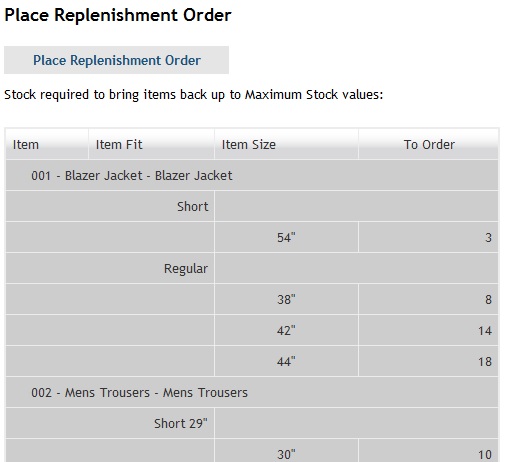
Figure 10 - An example of a Bulk Replenishment order that is ready for placing
NOTES:
- Placing this order will ensure that your stock will be brought back up to its Maximum Stock level.
- There is no option to change amounts prior to placing the order
- If not has been used since the last Bulk Replenishment Order to warrant a further Replenishment Order being placed, based on the formula at the top of this section, the ‘No stock used since last order placed.’ message is shown as per the Figure 11 below.
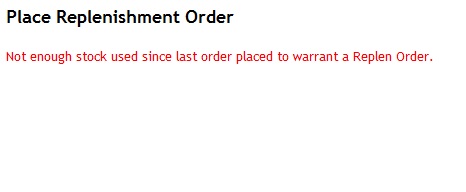
Figure 11 - No stock used message
Maximum and Minimum stock values
These can be adjusted at any time along with, or separate from the Stock values, by clicking on the checkbox titles ‘Enable edit Min Max values’. Selecting a ‘Stock Adjustment Reason’ and clicking on the ‘Adjust Stock Now’button will perform this action.
NOTE: It is NOT possible to set the Maximum Stock Value being greater or equal to the Minimum Stock value. All other CORRECT changes that have been made will be saved as required, and a warning as follows is displayed for each wrongly set Max Min value combination: WARNING - You tried to update an item with a maximum (2) less than or equal to a minimum (3). This is not allowed and has not been saved.
0 Comments