Some order types decrement the stock, and some don’t. The ones that do obviously relate to orders where stock has physically been taken (or will be taken) from the warehouse.
Order Types which decrement stock from the Warehouse will depend on how the Catalogues are set up, but these may typically be:
- New Starter
- Ad Hoc
For more information on the above talk to the Administrators responsible for the setting up of your Catalogues.
The placement of orders against these catalogues simply decrements the stock in the Warehouse set against the Catalogue and creates a stock transaction record for audit purposes.
IMPORTANT NOTE: If the ‘Only Allow Order If Stock’ flag is set at Catalogue level, which it will be in most cases, then it is only possible to place an order if there is stock for all items on the order. You will be warned if this is the case at the ‘Confirm your order’ stage of the Order Placement process. See the figure below:
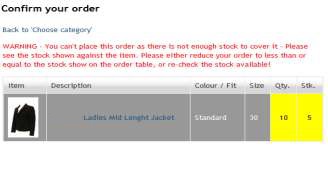
In this case the ‘Show Stock Values On Conf’ flag will also be set, showing the actual free stock values of the item. The system will highlight the values in the ‘Qty.’ and ‘Stk.’ Column for which there is not enough stock. In these cases you can either return to the previous screen to re-adjust your order to less than or
equal to the free stock, or do a physical stock check and re-adjust the values in the system if you think they are wrong.
Order Types which DON'T decrement stock from the Warehouse again will depend on how the Catalogues are set up, but these may typically be:
- Bulk Replenishment
- Bulk Ad Hoc
The placement of these orders has no effect on stock values. These order types are simply used to place orders on suppliers to request stock, which when delivered can then be booked into the warehouse to increment the stock.
Please see later sections for more detail on these types of order.
0 Comments